
If you own a website or a blog, then you must know how important it is to have a fast loading website. Any website that opens slow or has a low speed of loading is sure to lose traffic as none of the viewers like to wait much.
It is estimated that if a page doesn’t load within 5-8 seconds you will lose 1/3 of your visitors. Thus it is very important to keep the website fast so that it takes a little time to load and display the entire page properly. Checking a website for speed and load time is not difficult, all you need is a third party service that checks it.
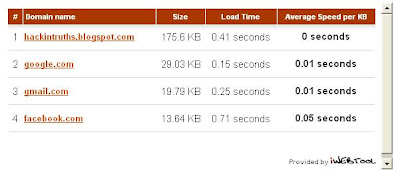
There are many online websites that checks the speed and load time of a website, here is one that I liked the most. The web service is called selfseo and provides a free website speed checker. All you need to do is just enter the name of the website or the page to check, click the Check button and it will display the load time (in seconds) and the speed of the website.
Moreover if you have more than one website to check, you can provide at the max 10 websites to check the speed. This feature will help you compare the load time and the speed with the other sites and your competitors.
If you find your website to be slow enough, then you should consider changing the design and post styles of your website, site structure or just move to a new and fast loading server.
Click here to Visit Website Speed Checker
It is estimated that if a page doesn’t load within 5-8 seconds you will lose 1/3 of your visitors. Thus it is very important to keep the website fast so that it takes a little time to load and display the entire page properly. Checking a website for speed and load time is not difficult, all you need is a third party service that checks it.

There are many online websites that checks the speed and load time of a website, here is one that I liked the most. The web service is called selfseo and provides a free website speed checker. All you need to do is just enter the name of the website or the page to check, click the Check button and it will display the load time (in seconds) and the speed of the website.
Moreover if you have more than one website to check, you can provide at the max 10 websites to check the speed. This feature will help you compare the load time and the speed with the other sites and your competitors.
If you find your website to be slow enough, then you should consider changing the design and post styles of your website, site structure or just move to a new and fast loading server.
Click here to Visit Website Speed Checker


Look for Appz in Parent Directory
intext:"parent directory" intext:"[EXE]"
intext:"parent directory" index of:"[EXE]"
intext:"parent directory" index of:"[RAR]"
Note: This will look for any exe or optionaly for zip, rar, ace, iso, bin and etc.
Look for Moviez in Parent Directory
intext:"parent directory" intext:"[VID]"
intext:"parent directory" index of:"[VID]"
Note: This will look for any video filetype in parent directory. You can optionaly add index:"xvid" or intext:"divx" for specific codec movie.
Look for Music in Parent Directory
intext:"parent directory" intext:"[MP3]"
intext:"parent directory" index of:"[MP3]"
Note: This will look for any music files.
Look for Gamez in Parent Directory
intext:"parent directory" index of:"[Gamez]"


To install google doodle of your choice:

- First go to this webstore of google.
- Now click on install under favourite doodle so that you can set the default doodle of your choice. (Remember you have to use chrome browser for this thing to work)
- Now go to the google doodles page.
- Choose the doodle which you like and click on Make This My Favourite Doodle! under the doodle which you want.


- Now to check your doodle go to Google Home Page.
You
have finally set the doodle of your choice. You have thousands of
doodle to choose from. Now style your google homepage the way you want.


Now to save the information of it's users google lauched a service named Takeout which people can use to backup all their data on available on google with a click. Keeping in mind the importance of the google users information, google has done a great job by launching this service. This service is brought to you by The Data Liberation Front.
What all information you can take a backup of :
- The list of the sites you did a +1
- Your Buzz data.
- Your Contacts and Circles.
- Your Picasa Albums.
- Your Google Profile.
- Your google plus Stream data.
Note: You can even backup a particular data if you want.
How to backup?
- Firstly visit http://www.google.com/takeout
- Now sign in to the google account you want to take the backup of.
- Now if you want to take the backup of all your data then simply click on Create Archive.

- Or if you want to backup a particular data then firstly click on Choose Services and then select the service you want to take the backup of (you can select multiple services) and then finally click on Create Archive.

- Once you click on create archive the processing will start. After the processing completes simply click on the download button and then the downloading will start.

Now you have all your google data in your computer and you need not to worry of it's being lost by some mistake. Enjoy and keep watching..


The new sign-in page looks clear and neat same as new mail interface, and the White and Grey combinations gives new perfect look. Sign-up button is now located in the top right corner with good color. I love the new look and feel. This New Sign in page is rolling out for all users one by one. Users will notice a small text link at the bottom that they are viewing new sign-in page and Feedback option also. Same footer have the link to switch to old Sign-in interface.

So enjoy the new G-Mail Login page..

Recently, Google Search got a new look and it's awesome. And now it's
time for GMail. Today, Google has added two new themes, which you can
find under Themes Tab in Gmail Settings, named "Preview(Dense)" and
"Preview". These are actually the previews of the new Gmail Look which
you can try out now! Here is the Preview of the new Inbox:
 |
| Image By Google |
And here's the preview of the Conversation:
 |
| Image By Google |
It seems like Google has started to upgrade all
it's services to this new Google Look! At the end of the official post,
it is stated that Google Calender will soon be updated.
If you're using Gmail and want to switch to this new look, then follow these instructions:
[1]Go to Gmail and Sign in.
[2]Now, click on the Settings Button (Top Right corner of the screen) and under it, click on "Mail Settings".
[3]Next, Click on the Themes Tab and under it you'll find two new themes (at the end): "Preview" and "Preview Dense".
[4]Select one according to your need and click on save.

- Mark Zuckerberg

272,925 followers
- following
- Larry Page

150,064 followers
- following
- Sergey Brin

102,794 followers
- following
- Mashable News

75,874 followers
146 following
The top source for news in social and digital media, technology and web culture.
- Robert Scoble

65,259 followers
4065 following
Searching for world-changing technology for Rackspace, world's largest web hosting company.
- Vic Gundotra

64,462 followers
- following
- Leo Laporte

63,425 followers
431 following
Podcaster, broadcaster, Chief TWiT and The Tech Guy
- Kevin Rose

61,240 followers
104 following
My name is Kevin.
- Ray William Johnson

56,603 followers
4,983 following
- Felicia Day

55,548 followers
- following
Web series creator, gamer, slight misanthrope.
- Tom Anderson

48,085 followers
- following
- Matt Cutts

47,231 followers
- following
- Markus Persson

42,967 followers
57 following
Founder & Game Developer at Mojang
- Gina Trapani

37,330 followers
183 following
ThinkUp lead developer, This Week in Google co-host, Todo.txt apps creator, founding editor of Lifehacker
- Marissa Mayer

36,707 followers
221 following
Geek, Googler, San Franciscan, Wisconsonite
- Bradley Horowitz

33,638 followers
1076 following
Google+
- MG Siegler

29,731 followers
361 following
I roam the badlands. An outlaw hunting outlaws. A renegade.
- Pete Cashmore

29,516 followers
12 following
- Jeff Jarvis

27,831 followers
473 following
- Tim O'Reilly

26,469 followers
72 following
- Trey Ratcliff

26,986 followers
651 following
I’m a warm-hearted, old-school gentleman explorer with really cool toys.
- michael arrington

25,109 followers
96 following
- Loic Le Meur

24,375 followers
388 following
founder of Seesmic and LeWeb conference, I love starting things.
- Sarah Lane

24,369 followers
148 following
TWiT, Tech Host/Writer/Producer/Editor, Catwoman
- Philip DeFranco

22,746 followers
13 following
I am Philip DeFranco . My home world of Gallifrey was time locked.
- Seth Godin

23,105 followers
3 following
- Kelly Ellis

22,391 followers
- following
what is this i don't even
- Chris Brogan

20,704 followers
- following
Helping people own their future. http://chrisbrogan.com
- Mark Cuban

20,517 followers
58 following
HDNet & HDNet Movies pimp and keeper of the Larry OBrien Trophy !
- Veronica Belmont

21,083 followers
376 following
Podcaster, Video Host, Book Worm
- 許茹芸

19,994 followers
49960 following
官方網站 http://valenvoice.com
- Chris Pirillo

19,883 followers
3976 following
Geek for Hire
- William Long

20,191 followers
- following
月光博客 龙威廉
- Natalie Villalobos

20,694 followers
- following
Community Manager for the Google+ project
- Evan Williams

19,880 followers
25 following
- The Next Web .

19,892 followers
1,447 following
Global technology news, business & culture.
- Thomas Hawk

18,677 followers
3892 following
Making Your G+ Experience More Beautiful One Photograph at a Time
- Michael Dell

19,388 followers
- following
- Gary Vaynerchuk

18,588 followers
82 following
+ this :)
- Andy Hertzfeld

18,357 followers
204 following
software wizard
- Om Malik

17,943 followers
107 following
- 谷奥

17,471 followers
7 following
我姓奥,名谷,字官方,真的。。。
- Danny Sullivan

17,425 followers
489 following
Editor, SearchEngineLand.com, covering Google, SEO, PPC, search engines and search marketing.
- Chris Messina

16,971 followers
550 following
Agent of free will.
- Briian Tsai

16,752 followers
163 following
我的網站:http://briian.com/ ,我的 Google+ 帳號專屬網址: http://briian.com/+
- Ben Parr

16,608 followers
1053 following
Journalist. Scuba Diver. Traveler. Swing Dancer. Romantic. Space Station Enthusiast. Entrepreneur.
- Justine Ezarik

16,214 followers
- following
being awesome since 1984
- Steven Levy

15,823 followers
- following
Still writing after all these years
Subscribe to:
Posts (Atom)
Popular Posts
-
Hack / Bypass .asp sites using SQL Injection
 Hack any .asp sites with SQL Injection attack. 1st, Open Google and search for adminlogin.asp or admin\login.asp 2nd, Open any searc...
 -
What is Captcha ????
 CAPTCHA stands for C ompletely A utomated P ublic T uring test to tell C omputers and H umans A part . A CAPTCHA is a...
 -
Get upto 100 MBPS Internet speed [Funny Trick]
 Today I will show you how to Fool your friends. They should think that you have internet connection up to 100 MBPS speed. 1 st ,...
 -
WEAKERTHAN - Another OS For Hackers
 Weakerthan 3.6 OS for Hackers Most of the hackers would have heard about Backtrack. Weakerthan is another Linux based pentesting...
 -
DNN Method - Website Hacking
 Step 1 : http://www.google.com Step 2: Now enter any of these dorks. 2nd dork is best for this type of hacking. :inurl:/tabid/36/l...
 -
Hack YAHOO ids by Brute Force Attack
 Today i will show you how to hack yahoo ids by brute force attack.. Step 1: Download Brutus Force from Here and Extract it on desk...
 -
How to Run Mobile Games on PC
 How to Run Java mobile Games On PC 1st, Download KEmulator from the link bellow. 2nd, Extract and run KEmulator.exe 3rd, Goto...
 -
How to Unlock your Cellphone
 What are Unlocked Cellphones? and Why anybody would want to Unlock it? An Unlocked Cellphone is one that can be used on all networks ...
 -
EmbeePay - Legit or Scam ??
 EmbeePay is one of the most popular sites providing free mobile recharge on Facebook. There is so Many people working hard receive a free r...
 -
Google Parent Directory Ultimate way
Look for Appz in Parent Directory intext:"parent directory" intext:"[EXE]" intext:"parent directory...